Blender add-on
Montolize
anything.
Montolizer rebuilds a mesh, or a fire and smoke volume, out of interlocking LEGO bricks using Geometry Nodes, then colors every brick to match the real palette.
Matched against the official LEGO palette
- Red#B40006
- Yellow#F7D117
- Bright Light Orange#FFA700
- Dark Bluish Gray#636666
- White#F2F3F2
An Explosion Volumetric Database, montolized frame by frame.
What it does
Every stud, placed on purpose.
-
Select a mesh, or a smoke and fire volume, and Montolizer rebuilds it out of interlocking bricks. The result comes back as real geometry driven by Geometry Nodes, so it stays editable afterward.
montolizer.montolize -
Auto Color reads the object's texture, or a volume's temperature and density grids, and matches each brick to the nearest color in the official LEGO palette using Lab color space rather than raw RGB.
Color Mode: Auto -
Surface presets bias that match toward colors real sets actually use for vegetation, sand, smoke, fire, or ice, so a tree reads green instead of whatever color happened to be nearest.
Preset: Vegetation · Sand · Smoke · Fire · Ice -
Fire Glass and Full Glass swap in real glass shaders behind the emission, so embers and lit bricks pick up refraction instead of sitting flat.
Fire Glass · Full Glass -
Slope brings in angled brick types instead of flat ones only. The amount can be dialed anywhere in between and reapplied to every already-baked frame instantly.
Slope: None → Sloped -
Animated bakes run across a frame range and hand back a single control empty. Playback Speed and Time Offset are driver based, so a whole bake can be retimed without rebaking a single frame.
Playback Speed · Time Offset
Inside Blender
Everything lives in one tab.
Montolizer adds a single tab to the N-panel. Setup Bricks loads the brick resources once, Setup Mesh / VDB preps whatever is selected, and Montolize Selected Mesh runs the bake. Two sub-panels handle animation timing and per-frame color and slope afterward.
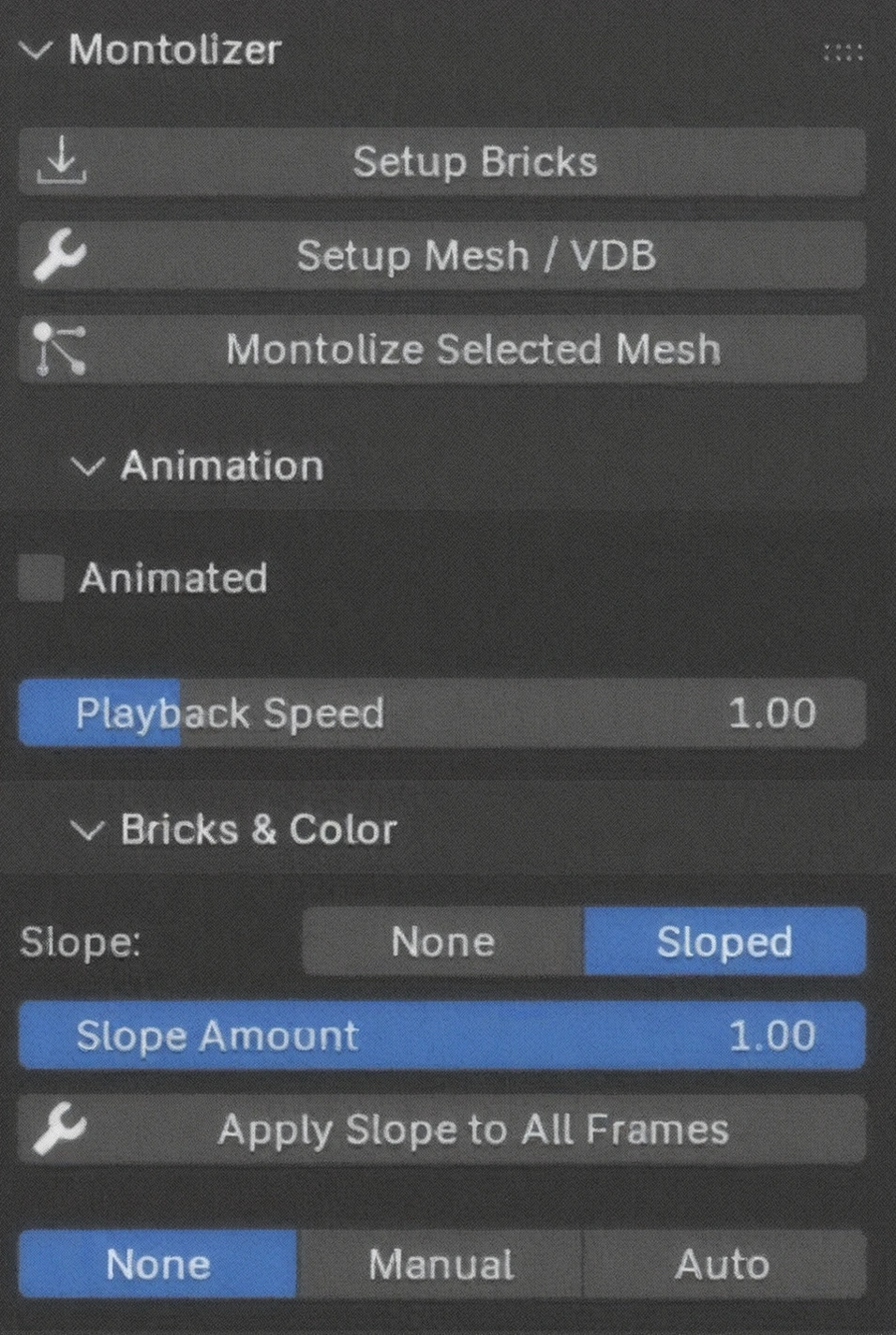
- Setup Bricks
- Setup Mesh / VDB
- Montolize Selected Mesh
- Animation · Playback Speed
- Bricks & Color · Slope, Slope Amount
- Color Mode · None, Manual, Auto
Get it running
Four steps, then you're montolizing.
-
01
Clone or download the repository from GitHub.
-
02
In Blender, open Edit → Preferences → Add-ons → Install.
-
03
Select the downloaded file, then enable Montolizer in the list.
-
04
A new Montolizer tab appears in the viewport sidebar. Start montolizing.